
How to Reduce Spam Calls and Robocalls
This guide uses only official sources: the FTC’s consumer guidance, Apple’s and Google’s own documentation, and what the carriers publish about their own tools. Nesswick has not tested any paid call-blocking app, and makes no claim about how well one performs. Verified 7 October 2026.
Most people start with the National Do Not Call Registry, and most people are disappointed. It is worth understanding why before you spend an evening on this.
The FTC’s own description is that the Registry “is a list that tells registered telemarketers what numbers not to call, but it doesn’t block calls.” And on the calls that actually bother people: “Being on the Registry won’t stop calls from scammers making illegal calls.”
So registering is worth two minutes, but it is not the answer. The answer is four separate layers, and they work in a particular order.
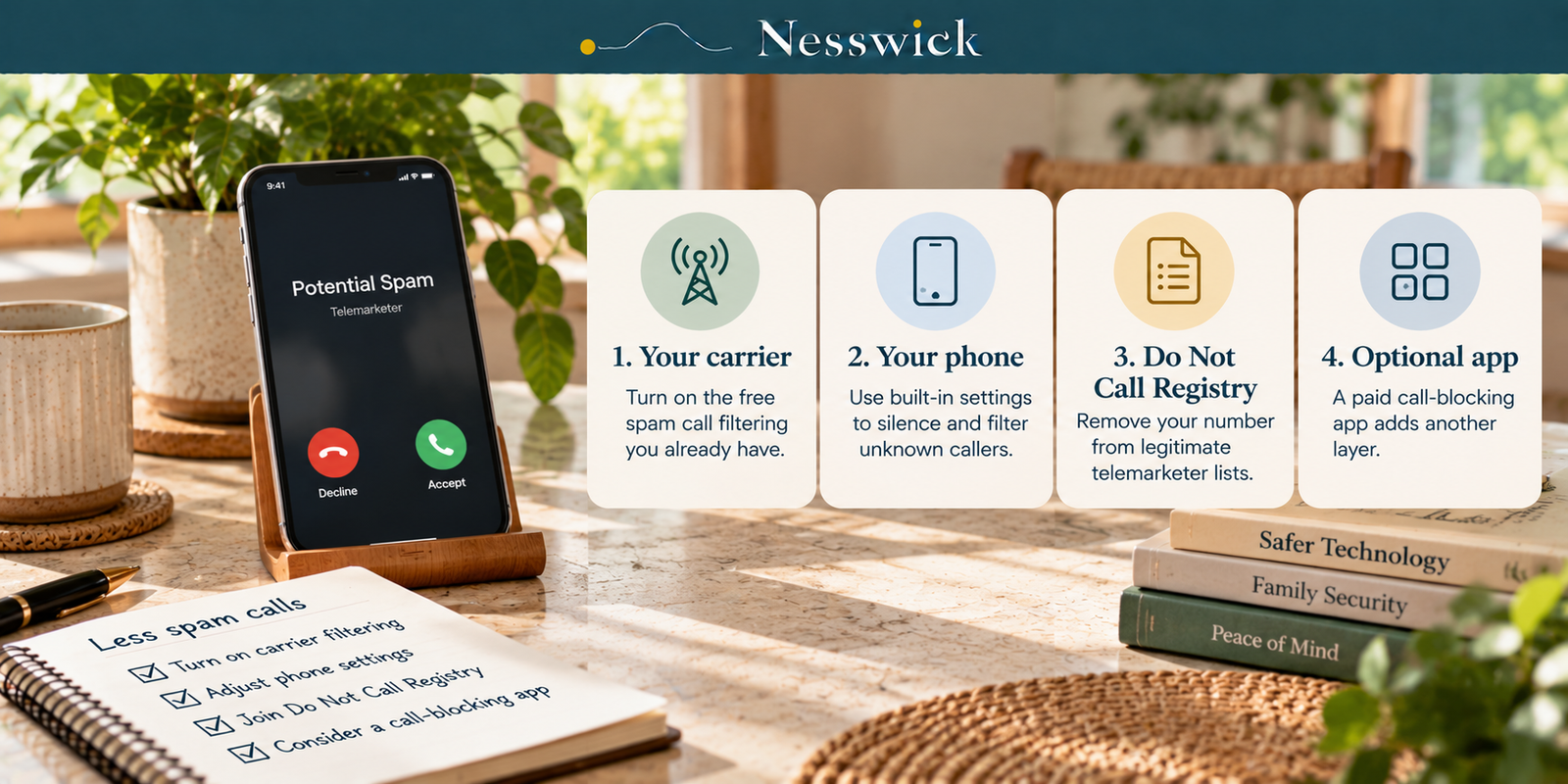
The four layers, and what each one is for
Think of it as four filters between a stranger’s dialler and your ringtone.
Your carrier’s network catches the largest volume, before the call reaches your phone at all. It is free on all three major US networks.
Your phone’s own settings catch what the network let through, using a rule about who is calling rather than a judgment about what they want.
The Do Not Call Registry does one narrow job: it removes you from the lists of companies that follow the law.
A paid app is a fourth layer, and it is the only one that costs money. It is also the one every article on this subject leads with.
Work through them in that order. Most households find the first two are enough.
Layer one: turn on what your carrier already gives you
This is the step people skip, and it is the one with the biggest effect, because the filtering happens on the network before your phone rings.
T-Mobile includes at no extra cost what it lists as “Scam Likely, Scam Block, personal number blocking, Potential Spam identification, spam calls sent to voicemail, Callback Protection, and Safe Web Browsing.” That is a substantial free tier, and it is on by default in part. T-Mobile is also unusually straight about the trade-off: “Turning on Scam Block might block calls you want; disable any time.”
Verizon gives you Call Filter free, and describes it plainly: it “blocks potentially fraudulent calls by automatically sending them to voicemail, but you can also block unwanted or nuisance calls with the free Call Filter app or through My Verizon.” Paying for Call Filter Plus adds two things: “identify unknown callers by name and customize your spam block list.” Verizon does not publish that price on the page we read, so we are not quoting one.
AT&T publishes a comparable set of tools. We could not retrieve AT&T’s security-tools page during verification, so nothing here is attributed to AT&T. If you are on AT&T, the tools exist; check the current details on att.com rather than taking a number from us.
While you are there, one thing worth knowing about the technology underneath all of this. Carriers now authenticate caller ID between networks, which is why some calls arrive marked as verified. Verizon states the two limits of that plainly: it “can only verify a call if the caller is using a network that has the same capabilities as Verizon’s network,” and (the sentence that matters most in this whole article) “Verizon cannot guarantee the intent of callers that are verified.”
A verified call is a call whose number is really its number. It is not a call from someone honest.
Layer two: the switch already on your phone
On an iPhone, the setting is Silence Unknown Callers. Apple’s description of what it does: “Calls from unknown numbers are silenced and sent to voicemail.” You reach it through Settings, then Apps, then Phone: Apple moved these settings under Apps, so if you remember them living somewhere else, that is why.
Recent iPhones split this into two behaviours worth knowing apart. Apple describes them as: “Ask Reason for Calling means these calls are screened (the caller is asked why they’re calling before your phone even rings); and Silence automatically silences these calls and sends them to voicemail.” Screening is the gentler option: the call still gets a chance, it just has to explain itself first. If you are on an older release, Apple notes that “on software versions earlier than iOS 17, Live Voicemail also needs to be turned on to use call screening.”
The catch is the obvious one: anyone not in your contacts is unknown. The school office, the pharmacy, a plumber returning your call. They go to voicemail. For most households that is a fair trade; for someone waiting on a call from a hospital it is not.
On an Android phone, open the Phone app, then More options, then Settings, then “Caller ID and spam,” and turn on “See caller ID & spam.” Filtering goes a step further, and Google is specific about what happens: “You don’t get missed call or voicemail notifications, but filtered calls are in your call history, and you can check your voicemail.” Nothing disappears. It simply stops interrupting you.
Google also states what the feature does not send: “Google doesn’t get phone numbers from your Contact list.”
Layer three: register, and expect exactly what it delivers
Go to donotcall.gov and register. It takes two minutes, and it is worth doing for one reason: it removes you from the calling lists of companies that obey the law, and a real share of nuisance calls come from companies that do.
Set your expectations from the FTC’s own numbers. “Your phone number should show up on the Registry the next day, but it can take up to 31 days for sales calls to stop.” And you never have to do it again: “your registration will never expire. The FTC will only remove your number from the Registry if it’s disconnected and reassigned, or if you ask to remove it.”
Some calls remain legal whether you register or not. The rules still permit political calls, charitable calls, debt collection calls, purely informational calls, and surveys, as long as they are not carrying a sales pitch. If a survey turns into an offer, that is a sales call and the Registry covers it.
Layer four: whether to pay for an app
The FTC’s framing depends on what kind of phone you have. For a mobile phone, “one of the best ways to block unwanted calls on a cell phone is to download a call-blocking app, which acts like a filter.” For a traditional landline, “consider buying and installing a call-blocking device.” For an internet-based phone, “internet-based call-blocking services block unwanted calls on phones that use the internet.”
Two things to hold on to. The FTC notes that “some apps are free, but others charge a fee” – this is not automatically a purchase. And an app is layer four for a reason: if you have not turned on your carrier’s free filtering, you are paying a subscription to do a job you already own.
We have not tested any of these apps, so we make no claim about how accurately any of them identifies a call. What a paid app buys and where it stops is a longer answer, and it has its own guide.
The habits that make it worse
Three things reliably increase the volume, and all three are things people do while trying to fix it.
Answering. A dialler that reaches a live human learns the number is live.
Pressing a key. The FTC is blunt about this: “If you get an illegal robocall, hang up and don’t call back. Don’t press a number, which could lead to more robocalls.” The press-9-to-be-removed option is not a removal mechanism.
Calling back. A missed call from a number you don’t know is not an invitation.
There is a fourth, which is subtler. Blocking individual numbers feels productive and achieves close to nothing, because the numbers are disposable, often deliberately made to resemble your own. Block a number if it is a person you want to stop hearing from. Do not try to block your way out of automated calling.
Reporting, which is worth the ninety seconds
Reporting will not stop your phone ringing tomorrow. It is how the pattern gets seen.
If you just want to report a call, the FTC directs you to “visit DoNotCall.gov to fill out a reporting form.” If money was lost, that is a different route: “report it at ReportFraud.ftc.gov.”
Both take about a minute and neither requires you to have kept anything.
What this will and will not achieve
Honest expectations, because the marketing in this category is unusually poor.
You will reduce the volume, probably substantially, mostly from the first two layers. You will not reach zero, and anyone promising you zero is selling something. Caller ID authentication tells you a number is genuine, not that a caller is; that is Verizon’s position, not ours. And filtering that is aggressive enough to catch everything will eventually catch something you wanted, which T-Mobile says out loud and most vendors do not.
The realistic outcome is a phone that rings a handful of times a week instead of a handful of times a day, achieved with free tools, in about twenty minutes.
What to do this week, in order
- Open your carrier’s app and turn on its spam filtering. Ten minutes, no cost.
- Turn on Silence Unknown Callers on iPhone, or caller ID and spam on Android. Two minutes.
- Register at donotcall.gov. Two minutes, then wait up to 31 days.
- Stop answering, stop pressing keys, stop calling back.
- Give it a fortnight. If the volume is still unmanageable after all four, that is the point at which paying for an app is a reasonable question, not before.

Affiliate Disclosure
Current relationship: Nesswick does not currently use affiliate links in this article. Product and service references are included for editorial purposes.
Sources and Methodology
This is an official-documentation guide. No hands-on testing was performed, and no call-blocking app was installed. We make no claim about how accurately any product identifies or blocks a call, because that requires testing we have not done.
Consumer guidance is taken from the FTC’s own pages, quoted rather than paraphrased, with their stated update dates. Platform behaviour is taken from Apple’s and Google’s own support documentation. Carrier features are taken from each carrier’s own pages and attributed to that carrier, not presented as our finding.
Two gaps are disclosed rather than filled. The FCC’s robocall guidance and its call-blocking resources page both refused our retrieval attempts, so the FCC is not cited anywhere in this article even though its guidance is relevant. AT&T’s security-tools page returned an error, so no AT&T feature or price appears here. Where a carrier does not publish a price (Verizon’s Call Filter Plus) we say it is not published rather than supplying a figure.
Menu paths on iOS and Android change without notice, and Apple has recently relocated these settings. Verify against your own device rather than assuming a path is current.
General information for US readers. No tool, setting or subscription prevents every unwanted call, and none of them establishes that a caller is honest.
Last reviewed and verified: October 7, 2026.
Sources Referenced
- FTC – How To Block Unwanted Calls, consumer.ftc.gov, page states “Last Updated: January 9, 2026”, read 7 October 2026
- FTC – National Do Not Call Registry FAQs, consumer.ftc.gov, page states “Last Updated: August 13, 2026”, read 7 October 2026
- Apple – Manage unknown callers on iPhone, support.apple.com, read 7 October 2026
- Google – Use caller ID & spam protection, Phone app Help, support.google.com, read 7 October 2026
- T-Mobile – Scam Shield product page, t-mobile.com, read 7 October 2026
- Verizon – How to Block Spam Calls & Robocalls, verizon.com, read 7 October 2026
All verified 7 October 2026.