
Bitwarden vs Dashlane: Only One of These Still Has a Free Plan
If you last looked at this pair a while ago, the comparison has changed shape.
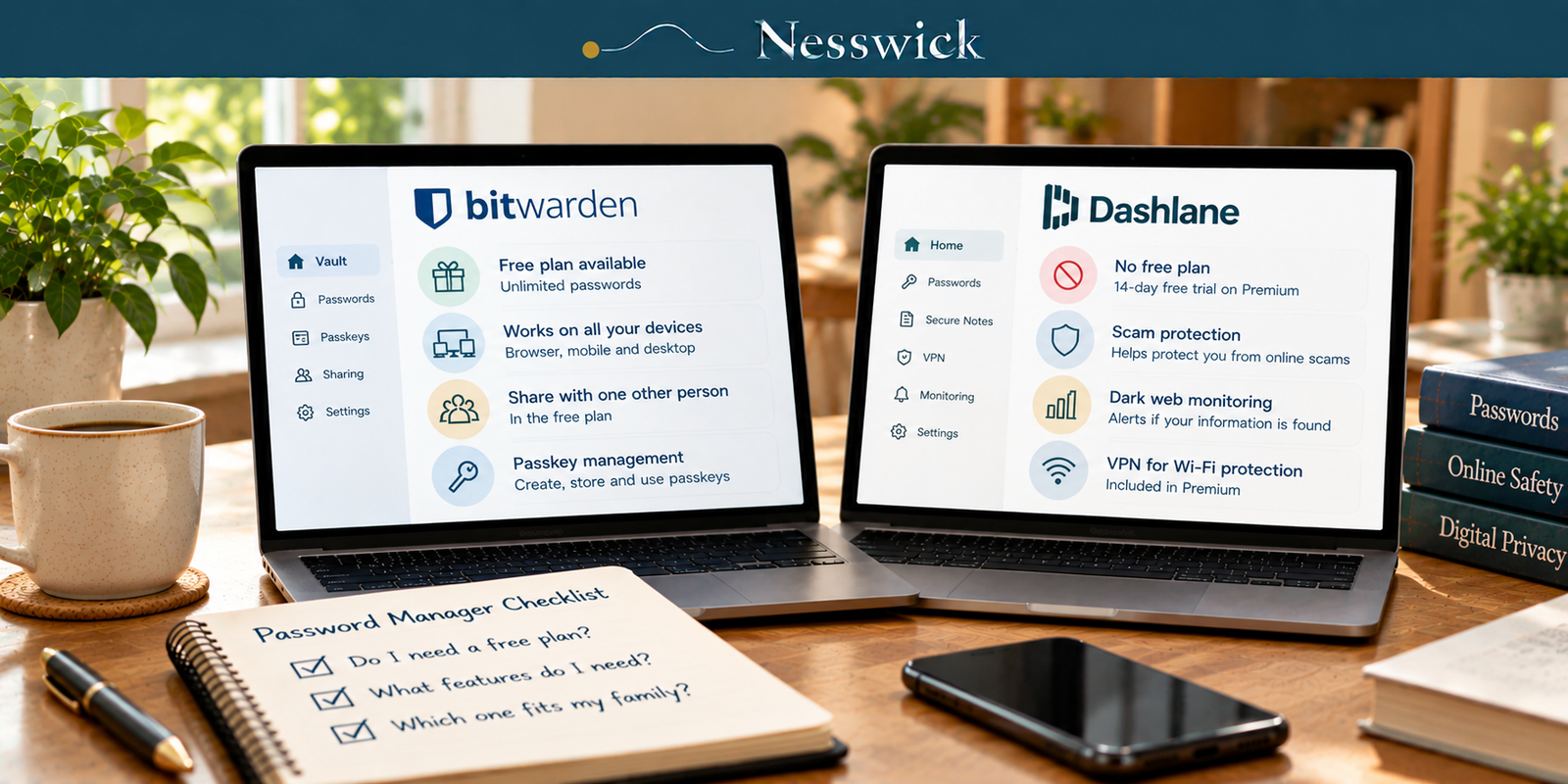
It used to be free-versus-free with a paid upgrade on each side. It is now a free product against a paid-only one. Dashlane’s own support documentation lists Dashlane Free among the plans it “no longer offers or sells”, and its current pricing page shows two cards: Premium and Friends & Family. There is no free option on it.
That single change reorganises the decision, and most comparisons of these two have not caught up.
We have not paid for either product. Every price and tier limit below was lifted from Bitwarden’s and Dashlane’s published pages on the date recorded at the close of this review.
What each side offers at zero
Bitwarden’s free tier is a working password manager. Unlimited passwords, unlimited devices, browser, mobile and desktop apps, passkey management and usage, and sharing with one other person. For one person who wants their passwords available everywhere and off a notepad, that is the job done, at no cost.
Dashlane’s free tier does not exist. Dashlane offers a 14-day free trial on Premium, and after that it is a paid product.
This is not a criticism of Dashlane. Plenty of good software has no free plan. It does mean that the sentence “compare the free versions” no longer describes anything, and that a reader arriving with a budget of zero has one option in this pair rather than two.
What the paid entry points cost
| Bitwarden | Dashlane | |
|---|---|---|
| Free tier | Yes, unlimited passwords, unlimited devices | None |
| Trial | n/a | 14-day free trial |
| Paid entry, one person | Premium $1.65/month, $19.80 a year | Premium $5.42/month billed annually, $65.04 a year |
| Devices | Unlimited | Unlimited |
Bitwarden Premium costs about $45 a year less than Dashlane’s entry plan. Both cover unlimited devices, so that gap is not buying device coverage.
What the extra money buys on Dashlane’s side, per its own plan card: AI-powered Scam Protection, dark web monitoring, secure notes with 1 GB of encrypted document storage, password history, and a VPN for Wi-Fi protection. What Bitwarden Premium adds over its own free tier includes Emergency Access, which Dashlane’s pricing page does not offer an equivalent to in the material we read.
Whether $45 a year is worth a VPN and dark-web monitoring depends on whether you already have those. Many people do, bundled with something else.
Getting back in, and getting someone else in
Bitwarden Premium includes Emergency Access. In Bitwarden’s own words, you “designate other Bitwarden users as emergency contacts who can request access to your vault in case of emergencies.” It is not on the free tier, and it is one of the clearest reasons to upgrade rather than a general sense that paid is better. We work through what that mechanism is for in password managers for seniors.
What Dashlane offers a locked-out individual subscriber is not on its pricing page, so no description of it appears here. One published caveat is worth flagging though: Dashlane marks passwordless login as “currently new users only”, which means an established account may be shut out of it.
On passkeys, both sides now publish support. Bitwarden puts “Passkey management and usage” in its free tier outright. Dashlane says users can create, store, sync, manage and use passkeys with Dashlane.
Who should stay free
Most people, honestly.
If your requirement is strong unique passwords, available on your phone and your laptop, Bitwarden’s free tier does that and stops there is a reasonable place to stop. A free manager holding good passwords is doing the security work that matters. Nothing about paying makes a password harder to guess.
Our page on the best free password manager and when to upgrade sets out what actually triggers an upgrade. In this pair there are two honest triggers. You want Emergency Access, or you want a VPN and dark-web monitoring bundled and do not already have them.
Who each one suits
Bitwarden suits anyone starting from zero, anyone unwilling to pay for a password manager, and anyone who wants Emergency Access for under twenty dollars a year. It is the cheaper product at every level.
Dashlane suits someone who wants a VPN and scam and dark-web monitoring in the same subscription as their passwords, and who is comfortable that there is no free fallback if they stop paying.
Neither is a security decision so much as a bundling decision. Both vendors publish encryption and security protections for stored vault data, and Nesswick has not audited either implementation, so nothing here rests on how either one handles a vault internally. The difference a reader can act on is what else arrives with the subscription and what it costs.
Where this review stops
Speed, polish and support are absent from everything above, because we have not used either product long enough to judge them and a pricing page cannot supply them. Several page-one comparisons run real tests; take those on their own terms.
One Dashlane detail stayed out of reach: how an individual gets back into a locked account. Dashlane now publishes its passkey position, including support for creating, storing, syncing, managing and using passkeys. Nothing here is borrowed from someone else’s review.



Related Resources
official pricing page
Affiliate Disclosure
Current relationship: Nesswick does not currently use affiliate links in this article. Product and service references are included for editorial purposes.
Sources and Methodology
This comparison was prepared without purchasing or running either product. Every price, tier contents statement and feature limitation was read from Bitwarden’s and Dashlane’s own pages on the review date below. Dashlane’s discontinuation of its free plan is quoted from Dashlane’s own support documentation rather than inferred from the absence of a free card on its pricing page. Annual equivalents are calculated from each company’s stated monthly figures and the arithmetic is shown. Dashlane’s individual recovery process remains unpublished, so readers should confirm it directly. Dashlane passkey support was re-verified. Nesswick names no winner and makes no claim about autofill reliability, application quality, sync behaviour, VPN performance or support, none of which we have observed. No password manager is described here as unhackable or as the safest available, a free tier is not described as unsafe, and a paid tier is not described as automatically safer. Prices and plan structures change; confirm current figures with both companies before subscribing.
Last reviewed and verified: September 27, 2026.