

How to Share Passwords Safely with Family
Introduction
Almost every family shares passwords somehow. The streaming login gets texted to a teenager, the shared shopping account is scribbled on a note by the kettle, the Wi-Fi password lives in a group chat. It works, and it also quietly leaves copies of your passwords in places you can never fully clean up.
This guide covers how to share passwords with family the safe way: household logins now, and handing over access to someone you trust later, without the risky habits most of us fall into.
What This Is and Why It Matters
The trouble with texting or emailing a password is not just that a message could be seen. It is that once a password is sent that way, copies of it exist in chat histories, inboxes, and notes apps, on several devices, with no way to pull them all back. If you ever need to remove someone’s access, you can’t, because you no longer know where the password has spread.
Safe sharing solves this by keeping the password in one controlled place and granting access to it, rather than scattering copies of it around.
Sharing Safely, Step by Step
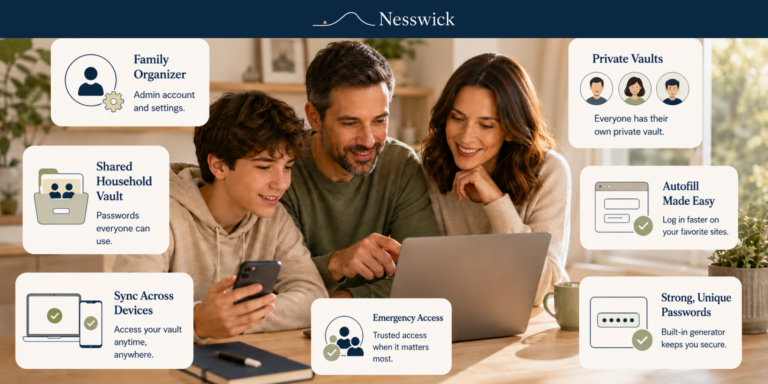
The main tool is a shared vault in your password manager. Put the household logins everyone genuinely needs—streaming, shared shopping, and family utilities—into a shared vault, and give the relevant family members access to it. They can use the login without having the password copied into a message, although some managers may still allow authorized users to reveal it.
If you’re wondering how to share one password with family for a single account, share that individual item with the specific person rather than opening up the whole vault.
When someone should no longer have access—perhaps a young adult moving out or a service you are handing over—revoke their access and, where it matters, change the password so the old one is retired cleanly.
It is also worth setting up emergency or legacy access, a feature many managers offer, so a partner or trusted adult child can reach essential accounts if something happens to you. It is a quiet kindness that saves a great deal of stress later.
What to Expect, and the Honest Limits
Safe sharing reduces risk; it does not remove it. A shared login is still only as safe as the people who hold it, and some services limit account sharing under their own terms, which is worth respecting.
Sharing through a manager is far better than messaging passwords around, but it is not a reason to share more widely than you need to.
Share what the household genuinely needs, with the people who genuinely need it, and keep the circle small. That, more than anything, is what keeps shared passwords safe.
When a Paid Option Is Worth It
The richer sharing features—multiple shared vaults, fine control over who sees what, and emergency access—often sit on paid family plans.
If your household shares a lot of accounts or you want to set up legacy access, a family plan can be worth it. For lighter needs, the sharing tools in a good free manager may be enough.
Frequently Asked Questions
Why is texting a password unsafe?
Because it leaves copies of the password in chat histories, inboxes, and notes across several devices, with no way to remove them all later if you need to withdraw access.
What is the safe way to share a household login?
Put it in a shared vault in your password manager and grant access to the people who need it. They can use the login without a password ever being copied into a message.
How do I stop sharing a password with someone?
Revoke their access in the manager and, where it matters, change the password so the old one no longer works. This extra step matters because the recipient may previously have viewed or copied the password, and revoking access alone will not undo that.
What is emergency or legacy access?
This feature, sometimes listed as password manager emergency access, lets a trusted person reach your essential accounts if something happens to you. Setting it up in advance can save your family considerable stress.


Related Resources

Affiliate Disclosure
Some of the password managers referenced here may be products we earn a commission from if you sign up through our links. It never changes this guide, which is about sharing safely with whatever reputable manager you use.
Sources and Methodology
This tutorial draws on official manager documentation for sharing and emergency-access features and on widely accepted best practice. Steps reflect current official information rather than hands-on testing.