
Qustodio Review: You Buy a Different Product Depending on Your Child’s Phone
Qustodio can put parental controls for several kinds of devices into one dashboard, but the feature set is not identical on Android and iPhone. That platform difference should be checked before you choose a paid plan.
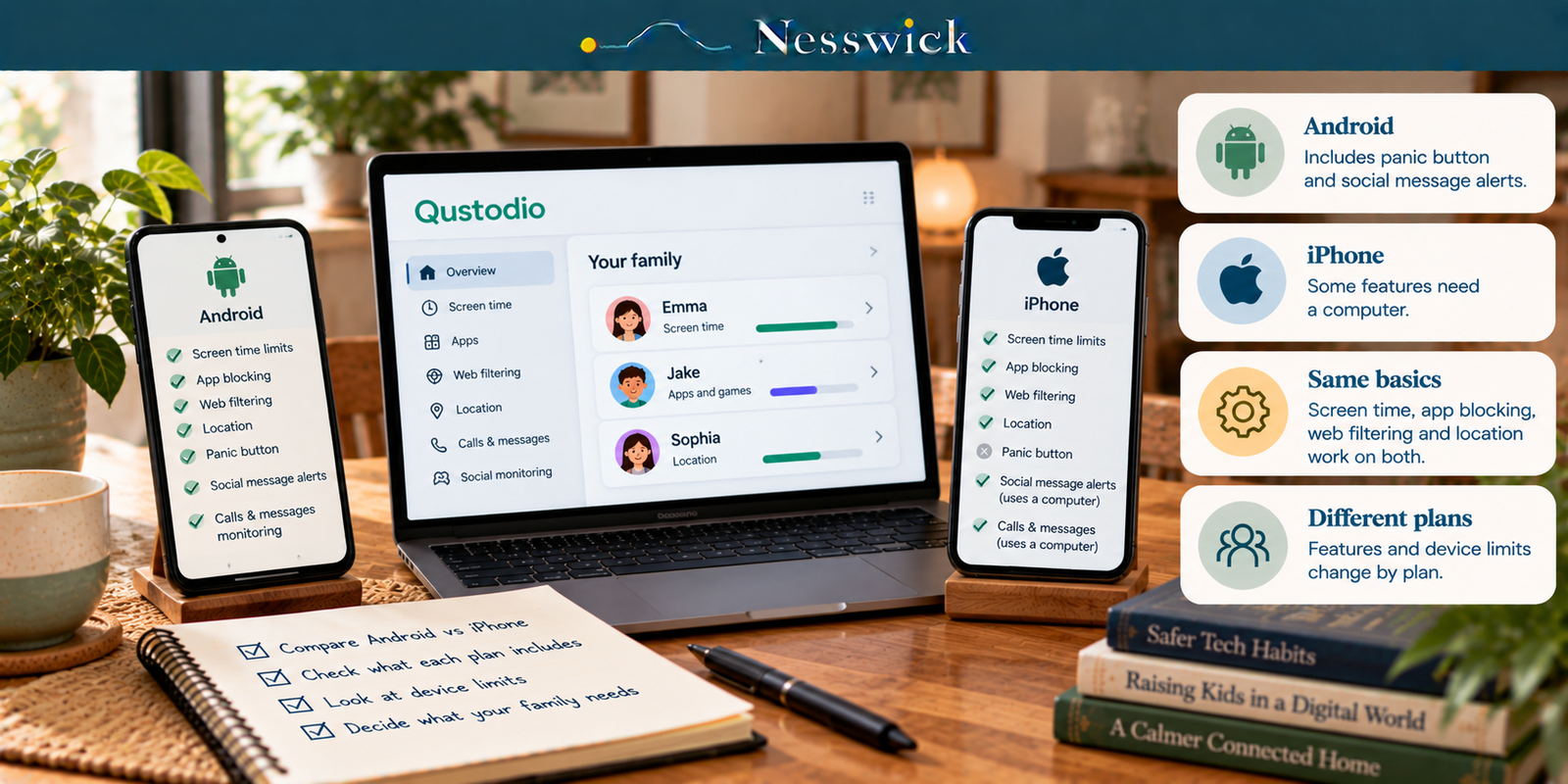
The clearest current difference is the Panic Button: Qustodio says it is available on Android phones for Premium users and is not available on iOS. Calls and messages monitoring is available on both platforms, but Qustodio’s iOS setup requires a Windows or Mac computer. Social monitoring is also available on iOS with a computer-based setup, so it should not be described as Android-only.
Nesswick has not purchased, installed or run Qustodio. This assessment compares Qustodio’s current published plans and platform documentation with the free parental-control tools documented by Apple and Google.
Android and iPhone are not feature-identical
| Feature | Android | iPhone / iPad |
|---|---|---|
| Web monitoring | Yes – supported browsers | Yes – supported browsers |
| Safe search | Yes | Yes |
| Time controls | Yes | Yes |
| App monitoring | Yes | Supported apps only |
| Location | Yes | Yes |
| Panic Button | Yes – Premium, Android phones | No |
| Calls & messages | Yes | Yes – requires Windows or Mac |
| Social monitoring | Yes | Yes – requires computer setup |
For iOS calls and messages monitoring, Qustodio says the child’s iPhone or iPad must already be protected with Qustodio and a parent must use a Windows or Mac computer for setup. Qustodio says the iOS device and computer need to be on the same Wi-Fi network for the information to update.
Qustodio’s current iOS documentation also says social monitoring is available with a computer. Its iOS calls-and-messages setup specifically describes WhatsApp and LINE alerts. That is materially different from the older claim that social-message alerts were simply unavailable on iPhone.
The Panic Button remains a genuine Android-only distinction. Qustodio says it is for Android mobile phones, is available to Premium users, and is not available on iOS or Android tablets without calling capability.
Current plans and pricing
| Plan | Current U.S. web price | Device limit | Care Plus |
|---|---|---|---|
| Free | $0 | 1 device | Not included |
| Basic | $59.95/year | Up to 5 devices | $12.99 add-on |
| Complete | $104.95/year | Unlimited devices | Included |
At the prices displayed on Qustodio’s U.S. website on October 18, 2026, Basic is $59.95 a year and Complete is $104.95 a year. Care Plus costs $12.99 as an add-on to Basic and is included with Complete. The free version protects one device with basic protection features.
The $45 annual gap between Basic and Complete is not just a device-limit difference. Qustodio describes Complete as adding advanced features beyond Basic, including calls and messages monitoring, more customizable rules and other premium capabilities, while also removing the device ceiling. Adding Care Plus to Basic therefore does not make Basic equivalent to Complete.
If you add Care Plus to Basic, the total is $72.94 a year. That arithmetic is correct, but it should be treated as Basic plus enhanced support – not as a substitute for Complete’s feature set.
What the free built-in tools already cover
Google Family Link lets parents set screen-time limits on compatible Android or ChromeOS devices, manage apps and permissions, approve eligible Google Play downloads and purchases, manage SafeSearch and some YouTube settings, and view the location of a child’s signed-in active Android device when the required conditions are met.
Apple’s current Screen Time and parental-control system can manage when a child uses apps and websites, what apps and content they can access, purchases and downloads, who they can communicate with, and content/privacy restrictions. Apple’s current iOS 27 parental controls also include newer tools such as Ask to Browse and expanded communication-safety controls on supported devices.
These built-in systems are a sensible starting point because they may already cover the limits, approvals and content restrictions your family needs. Qustodio becomes more compelling when you need one dashboard across different platforms or a specific monitoring feature that the built-in tools do not provide in the way you need.
When Qustodio adds the most value
A mixed-platform household. Qustodio supports Windows, Mac, Chromebook, Android, iOS and Kindle, so one service can cover a household that would otherwise use several platform-specific control systems.
Families that need Qustodio’s monitoring features. Calls and messages monitoring, social monitoring, activity reports and alerts may go beyond what a family is using in the built-in controls. The exact availability and setup requirements still depend on the child’s platform.
Families that need more than five protected devices. Qustodio says Basic protects up to five devices while Complete has no device limit.
For an iPhone household, the important question is not whether Qustodio works on iOS – it does – but whether the features you care about are supported directly on iOS, limited to compatible apps, or require a Windows or Mac computer.
Refunds and where you bought the subscription
For plans purchased directly from Qustodio’s website, Qustodio currently says you can contact its Support Team within 30 days of purchase to request a refund.
If you bought the subscription through Apple’s App Store or Google Play, Qustodio says the subscription and billing details are held by Apple or Google. Cancellation and refund requests for those purchases must therefore go through Apple or Google rather than Qustodio.
What this review does not establish
Nesswick has not tested Qustodio’s filtering accuracy, alert accuracy, battery impact, resistance to bypass or removal, ease of setup, day-to-day usability, or support response times. Those are real product-quality questions, but they cannot be established from provider documentation alone.
No parental-control product guarantees safety or blocks everything. Use controls as one part of a broader family approach that includes clear expectations, age-appropriate rules and regular conversations about online activity.

Affiliate Disclosure
Current relationship: Nesswick does not currently use affiliate links in this article. Product and service references are included for editorial purposes.
Sources and Methodology
This Research-Based Assessment was rechecked on October 18, 2026 using Qustodio’s current official pricing and Help Center pages, plus current Apple and Google parental-control documentation. Nesswick did not purchase or run Qustodio. Prices and feature availability can change, and app-store pricing can differ from direct web pricing, so readers should confirm the checkout and platform requirements before purchasing.
Last reviewed and verified: October 18, 2026.
Sources Referenced
- Qustodio – Official Plans and Pricing
- Qustodio – Care Plus
- Qustodio Help – What’s the difference between Qustodio for Android and iPhone/iPad
- Qustodio Help – How do I set up calls & messages monitoring for iOS devices?
- Qustodio Help – What is Qustodio’s Panic Button, and what does it do?
- Qustodio Help – What is Qustodio’s refund policy?
- Google – Family Link parental supervision documentation
- Apple Support – Use Screen Time to manage your child’s iPhone or iPad