
NordPass vs 1Password: What the Free Route Actually Gets You
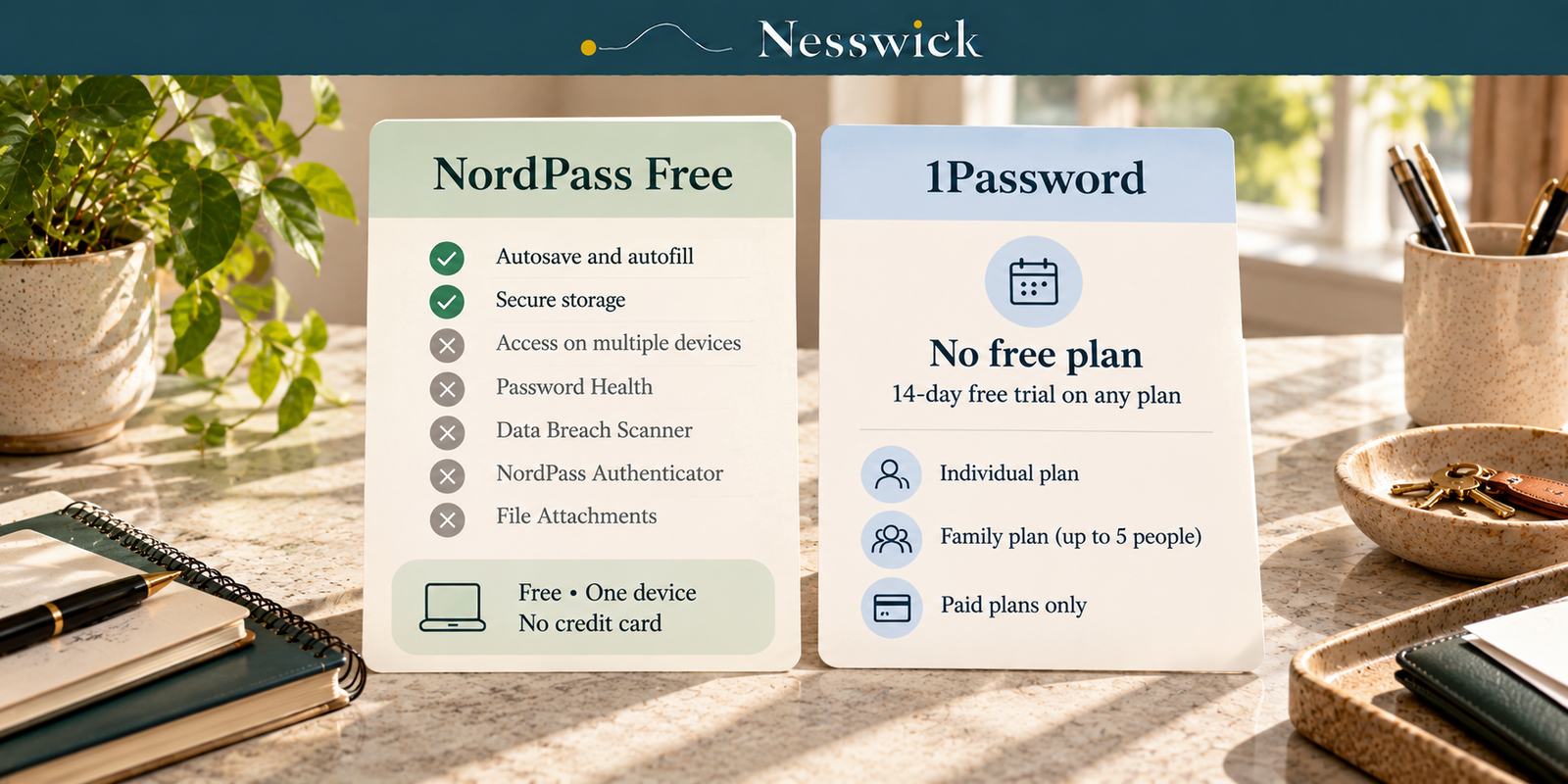
One of these has a free plan. The other does not. That sounds like the whole comparison, and it is where most write-ups start and stop.
It is worth a closer look, because NordPass Free is a narrower product than “free password manager” suggests, and because both companies use promotional pricing that can differ from the standing rate.
No subscription was bought for this comparison. The plan details, pricing and recovery documentation below were re-checked against current official NordPass and 1Password pages on October 5, 2026.
What NordPass Free actually includes
| Feature | NordPass Free |
|---|---|
| Autosave and autofill | Included |
| Secure storage | Included |
| Access on multiple devices | Not included |
| Password Health | Not included |
| Data Breach Scanner | Not included |
| NordPass Authenticator | Not included |
| File Attachments | Not included |
Five of the seven listed plan features are switched off, and the most consequential limitation is multi-device password access.
If your passwords live on one machine and you want basic autosave, autofill and secure storage, the free tier is a real option. If your main requirement is keeping the same password vault available across several devices, the Free plan does not provide that plan feature.
NordPass describes the free plan as a lifetime option with essential features and no credit card required.
1Password has no ongoing free tier. Its current Personal and Family page offers a 14-day free trial with no credit card required.
The prices, including the ones that arrive later
Both companies advertise discounted entry pricing. For 1Password, the current footnote says promotional pricing is for new customers who subscribe directly through 1Password.com, for the first year with annual billing; it is not available through Google Play, the Apple App Store or other third-party app stores.
NordPass, 1-year plan:
| Plan | Promotional | Standing | Accounts |
|---|---|---|---|
| Free | n/a | $0 | 1 |
| Premium | $23.88 first 12 months | $35.88 | 1 |
| Family | $44.28 first 12 months | $71.88 | 6 |
NordPass also sells a 2-year plan. At the publication-day check, Premium was $37.53 for the first 27 months against a standing $80.73, and Family was $67.23 against $161.73.
1Password, paid annually:
| Plan | Promotional | Standing | People |
|---|---|---|---|
| Individual | $2.99/mo, $35.88/yr | $3.99/mo, $47.88/yr | 1 |
| Families | $4.49/mo, $53.88/yr | $5.99/mo, $71.88/yr | 5 included |
At the current standing annual rates, NordPass Family and 1Password Families both total $71.88 a year. NordPass Family lists six user accounts; 1Password Families includes five users.
For one person, NordPass Premium’s current $35.88 standing annual rate is $12 lower than 1Password Individual’s $47.88 standing annual rate.
How many people
NordPass Family: 6 user accounts, as shown on the current plan card.
1Password Families: 5 included users. The current pricing page says the plan includes five users, and 1Password’s support documentation says it includes up to five people, with room to grow, paid with one subscription.
The base-plan headcount is therefore five. Because 1Password’s documentation allows room to grow, a household that needs more than five people should confirm the current additional-member terms with 1Password before subscribing.
Getting back in
The two products document recovery differently.
1Password Families uses family organizers for household recovery. Its current organizer documentation says organizers can restore access for family members who forget their 1Password account password or cannot find their Secret Key. 1Password also tells families to make sure they have at least one other family organizer, so another organizer can help if the primary organizer cannot sign in.
NordPass documents a personal Recovery Code process. Its support documentation says the Recovery Code is a unique 24-symbol code that can reset the Master Password if it is forgotten. NordPass also documents biometric recovery-code reset when biometrics are already enabled. If both the Master Password and Recovery Code are lost and no usable biometric route is available, NordPass documents a full account reset path that deletes vault items.
These are not identical recovery models: 1Password Families has another-person organizer recovery for family members, while NordPass’s consumer documentation centers on the user’s Recovery Code, biometrics in supported circumstances, and account reset as the destructive fallback.
Passkeys
Passkeys are supported by both products, so they are not a reason to describe either product as lacking modern passwordless credentials. NordPass says its passkey manager can create, store, use and share passkeys and that passkeys can be stored on any plan. 1Password documents saving passkeys and using them to sign in on supported websites and apps.
Because passkey availability can depend on device, operating system, browser and website support, this comparison does not turn those implementation details into a winner.
Who needs neither of these
A large number of readers.
Bitwarden’s free tier covers unlimited passwords across unlimited devices and costs nothing. If your requirement is simply your passwords on all your devices for free, that is an important alternative, and Nesswick covers the category in Best Free Password Manager and When It’s Worth Paying.
Free is not automatically less safe than paid. Paying generally buys additional capabilities and administration rather than making every paid plan inherently safer for every household.
Where each one lands
NordPass Premium suits one person who wants the paid features and prefers its lower current standing annual price.
NordPass Family suits a household of up to six. At the current standing annual rate of $71.88, it lists one more included account than 1Password Families at the same standing annual total.
1Password Families suits a household of five included users that values its documented family-organizer recovery structure.
Neither paid plan is necessary if the real requirement is unlimited passwords on multiple devices at no cost; Bitwarden’s free tier is a relevant alternative.
What documentation cannot tell you
Nesswick has run neither product for this comparison, so nothing here claims to measure autofill reliability, application quality, sync speed, browser-extension behavior, support responsiveness, or real-world recovery experience.
Prices and plan structures can change. Check the standing rate as well as any promotional rate before subscribing.

Related Resources
official pricing page
Affiliate Disclosure
Current relationship: Nesswick does not currently use affiliate links in this article. Product and service references are included for editorial purposes.
Sources and Methodology
This comparison was prepared without purchasing or running either product. Prices and plan limits were re-verified from NordPass’s and 1Password’s official pages on October 5, 2026. NordPass Free’s included and excluded plan features and current promotional and standing prices were rechecked during the publication-day review. 1Password’s current promotional-pricing conditions, five-user family headcount, family-organizer recovery wording and passkey documentation were checked against current official pages rather than retained as stale quotations. NordPass recovery and passkey support were also checked against current official NordPass documentation. Bitwarden’s free unlimited-passwords and unlimited-devices claim was rechecked as the alternative used in this comparison. Nesswick names no overall winner and makes no hands-on claims about reliability, application quality, sync speed, support or recovery experience.
Last reviewed and verified: October 5, 2026.
Sources Referenced
- NordPass – Plans and Pricing
- NordPass Support – What if I forgot my NordPass Master Password?
- NordPass Support – Forgot Master Password and no recovery code
- NordPass Support – How to reset NordPass account
- NordPass – Passkeys
- 1Password – Personal and Family Security
- 1Password Support – About 1Password Families
- 1Password Support – About family organizers
- 1Password Support – Save and sign in with passkeys
- Bitwarden – Pricing