

Best Free Password Manager and When to Upgrade
A good free password manager is one of the best security upgrades most people can make. For many people, the free tier is all they will ever need.
If you have been meaning to stop reusing the same two passwords across every account, this tool makes that easier without a subscription.
This guide explains what a strong free plan should include. It also covers why open-source code and independent audits are useful signs, not guarantees, and which needs make an upgrade worth it.
For passkeys, see our companion guide.
What best means here
As with our other free-versus-paid guides, best here means the best-documented free option for a clear need. This password manager comparison is based on official features and audit history.
It does not mean the best autofill, the easiest app to use, the most polished app, or a tested usability winner. We did not do hands-on testing.
We point you to documented facts and help you match them to your needs, not crown a number one.
Why a free manager is enough for most people
A password manager should make a unique, strong password for every account and remember them for you. That keeps a breach on one site from spreading to the rest of your accounts.
Reputable free managers do that job well. For most people, free is enough.
Paying is not about safety. It is about specific needs like family sharing and emergency access, which sit behind paid tiers.
Start free. Upgrade only when one of those needs shows up.
Objective selection criteria
Judge a free plan on facts, not marketing. The features that matter are unlimited passwords and devices, so the free tier does not quietly cap you. It should also store passkeys, support 2FA codes, and keep secure notes for things beyond logins.
Against those criteria, two well-documented free options stand out.
Bitwarden free tier
Bitwarden’s free personal plan includes unlimited passwords across unlimited devices, passkey storage, two-step login, and secure notes. It also lets you share with one other user.
For most people, that covers the basics without paying.
Proton Pass free tier
Proton Pass’s free plan includes unlimited logins, notes, and cards across unlimited devices. It also includes passkey support across devices, alerts for weak and reused passwords, and ten hide-my-email aliases.
That gives you a masked address instead of your real email. The alias limit is a standout free perk.
For most people, the free tiers above already cover the core job of a password manager: unique credentials, autofill, sync, and passkey storage. Pay only if a real need comes up.
For verdicts on usability and support, which we did not test, see our password manager reviews.
Free password manager comparison
| Free plan | Items and devices | Passkeys | 2FA storage | Notable extra |
|---|---|---|---|---|
| Bitwarden | Unlimited passwords, unlimited devices | Yes | Yes (two-step login) | Share with one user |
| Proton Pass | Unlimited logins, notes, and cards, unlimited devices | Yes | Up to 3 items | 10 hide-my-email aliases |
Security signals: open-source and independent audits
Two signals help you trust a password manager. Open-source means the code is published for anyone to inspect, which allows outside scrutiny. An independent audit means outside security experts have examined the product.
Bitwarden is open source, with its code publicly available, and it undergoes regular third-party security audits by named firms. Proton Pass is also open source and has undergone an independent security audit by Cure53.
These are genuinely good signs, but they are not proof of perfect security. Open code makes flaws easier to find; it does not guarantee there are none. An audit checks a product at a point in time and within a set scope; it does not certify that the product is flawless forever.
Treat both as reasons for more confidence, not as a promise that any manager is unbreakable.
Bitwarden free vs Proton Pass free
Because we did not test usability, we will not tell you which feels better. For this password manager comparison, the documented facts are enough.
Both cover the core essentials and store passkeys. Proton Pass’s free tier stands out for its hide-my-email aliases, and Bitwarden is notable for being open source with a long, public audit history.
Match those strengths to what you value, whether email masking or audit transparency, and try both, since both are free.
When to upgrade password manager
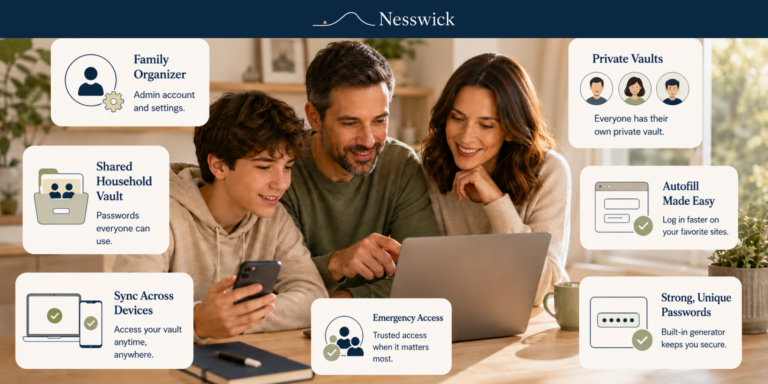
Free is enough for most people, but a few clear needs make a paid plan worth it. Consider a paid plan for family sharing across a household, emergency access that lets a trusted person recover your vault if something happens to you, an integrated 2FA app that keeps your codes in the same app, or extra storage and monitoring features.
Upgrade only when you have a real need, not because paid sounds safer. For core password management, it is not inherently safer.
- Family sharing: A free password manager for families usually stops at one other user.
- Emergency access: A trusted contact can recover your vault.
- Integrated 2FA app: Two-factor codes and passwords in one place.
- More storage or monitoring: File attachments, dark-web alerts.
Browser storage versus a dedicated manager
Your browser can save passwords, which is handy and free. A dedicated manager usually adds broader cross-browser and cross-device use, secure notes and other item types, more flexible sharing, and unified passkey handling.
Browser storage is a fine place to begin. A dedicated manager is a worthwhile step up for most people, especially those who use more than one browser or device.
Who should stay free, and who should upgrade
Stay free if you need unique passwords, autofill, cross-device sync, 2FA storage, and passkeys. That describes most people.
Upgrade if you need family sharing, emergency access, an integrated 2FA app, or extra storage and monitoring. Paying more will not help if you will not use those extras.
For the reader in the middle
If you are unsure, ask: Is anyone else in my household going to share logins with me? Would I want a trusted person to recover my vault if something happened to me? Do I want my 2FA codes in the same app as my passwords?
If you answer yes to any of these, a paid tier makes sense. If not, a free manager is very likely enough.
Bottom line
For most people, a reputable free password manager such as Bitwarden or Proton Pass is enough, and it is one of the best security habits you can adopt. Open-source code and independent audits are good reasons for confidence, but they are signals, not guarantees.
Upgrade when a real need appears, like family sharing or emergency access. Otherwise, let the free tool do the work of making unique, strong credentials that no person could reasonably remember alone.
Frequently asked questions
Is a free password manager safe? Reputable free managers cover most people’s core needs securely.
Which free manager is best? Bitwarden and Proton Pass are strong, well-documented free options; we do not crown a tested winner.
Does open source mean it is safe? It is a positive signal that allows public scrutiny, not a guarantee of flawless security.
When should I pay? For family sharing, emergency access, an integrated 2FA app, or extra storage.
Can free managers store passkeys? Yes. Both options here support passkeys.
Is my browser’s saved-password feature enough? It is a reasonable start; a dedicated manager offers more across browsers and devices.


Related Resources
Affiliate Disclosure
Some products or services mentioned on Nesswick may be ones we could earn a commission from if you choose to sign up through our links, at no extra cost to you. That never changes our guidance or what we recommend.
Sources and Methodology
This article is based on official product documentation for free-tier features and on independent security-audit information, including audits by Cure53 for Proton Pass. Nesswick did not perform hands-on testing; best means documented free options for clear needs, and no usability verdict is offered. Paid-tier prices change and should be confirmed on the official page.
Official sources referenced: