
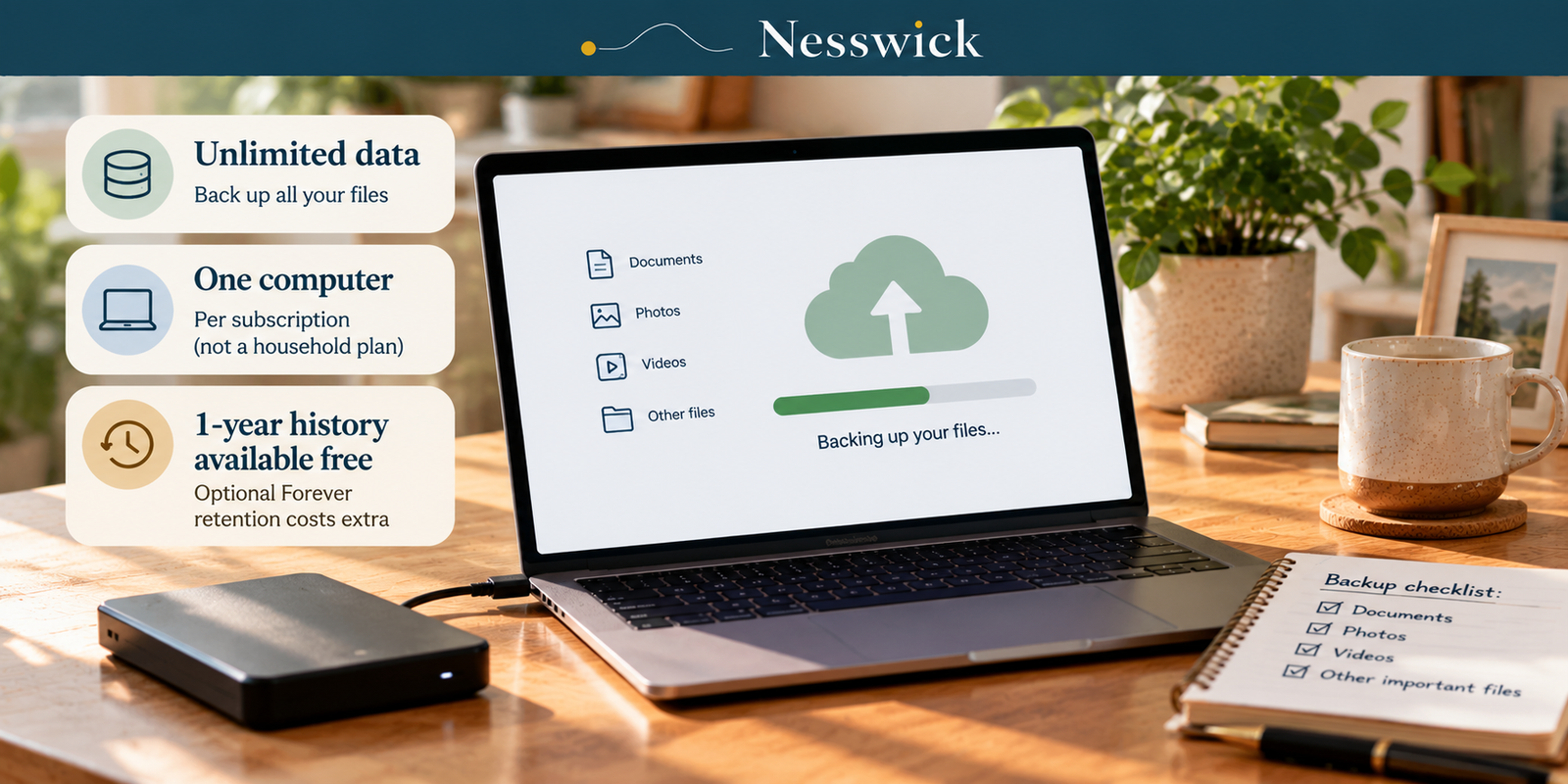
Backblaze Review: Unlimited Data, One Computer
Backblaze sells one thing to households and sells it plainly: $99 a year, back up everything, stop thinking about it. That is unusual in a category where most services meter storage, and the simplicity is real.
But “unlimited” is doing specific work in that sentence, and it is worth knowing exactly which work. It refers to how much data, not how many machines, and not how long the service keeps old copies of your files.
Nesswick has not bought or installed Backblaze. Every figure and condition below was re-checked against Backblaze’s current official pricing, feature and documentation pages on October 3, 2026.
The one thing to understand before anything else
Backblaze Computer Backup is licensed per computer. Personal Backup provides unlimited backup data for the licensed computer and its supported directly connected drives; it is not one subscription for every computer in a household.
Backblaze currently lists Personal Backup at $9 per month, $99 per year, or $189 for two years. Backblaze also describes Computer Backup licensing as per computer. A household with a laptop and a desktop therefore needs two licenses: at the annual rate, two computers cost $198 a year and three cost $297.
That single fact is central to the value calculation for a household, and it has nothing to do with how many gigabytes are stored on each licensed computer.
What $99 buys
| Billing | Current price | Calculated comparison |
|---|---|---|
| Monthly | $9 a month | $108 across 12 months |
| Yearly | $99 a year | $9 less than 12 monthly payments |
| Two years | $189 | $94.50/year; $27 less than 24 monthly payments |
There is no separate first-year promotional price in the current Personal Backup pricing shown here. Backblaze currently offers a 15-day free trial.
Unlimited data, with conditions
Backblaze says Personal Backup provides unlimited data and no file-size limit, but that does not mean every kind of local or network data is included.
- Network-mounted drives and NAS devices are excluded from Computer Backup.
- Removable media such as CDs, DVDs and SD cards are not supported as removable media.
- Operating-system files, application files, empty folders/directories and transient internet files are excluded.
- Several file extensions are excluded by default, including ISO, VMC/VHD/VMSN, SYS and EXE. Backblaze documents that many file-type exclusions can be removed in the client settings.
- Backblaze does not back up Time Machine backup data, Retrospect RDB backup data, or folders shared from another computer.
The practical exceptions matter. If your photo library lives on a NAS, Computer Backup will not back up that NAS. If a drive contains Time Machine data, Backblaze excludes that backup data; its documentation describes alternatives such as disabling Time Machine for that drive or partitioning the drive.
External-drive retention depends on Version History. With the default 30-Day Version History, Backblaze says to reconnect an external hard drive at least once every 30 days; if it stays disconnected longer, its backed-up data may be removed. With 1-Year Extended Version History, Backblaze retains a disconnected external drive for up to one year and says you do not need to reconnect it every 30 days to retain that data. Extended Version History is not retroactive.
How far back it goes
| Version History | Current cost |
|---|---|
| 30 days | Included by default |
| 1 year | Enable for free |
| Forever | $0.006 per GB per month for files older than one year |
By default, Backblaze retains a 30-day Version History. One-Year Extended Version History can be enabled at no additional storage cost. Forever Version History charges $0.006 per GB per month for versions or deleted files older than one year.
So the service is unlimited in current backup volume, while retention of old or deleted versions depends on the Version History setting. Enabling the free one-year option extends the recovery window going forward; it does not restore versions that were already removed before the setting was enabled.
The restore drive, and the condition behind “free”
Restoring over the internet is free. Backblaze says you can sign in from anywhere to restore files, and its iOS and Android apps can browse and download backed-up files.
For a large restore, Backblaze currently offers a USB hard drive up to 8TB for $279, with shipping and handling included. If the drive is returned to Backblaze within 30 days, Backblaze says it refunds the purchase. Its pricing comparison also describes mailed hard-drive restores as “free” and explains that they are free upon return within 30 days.
Practically, the $279 purchase amount can leave your account first. The restore becomes effectively free only if the eligible drive is returned within the stated 30-day window; return shipping and any non-refundable customs, taxes, tariffs or duties are separate considerations.
Encryption, in the company’s words
Backblaze currently lists encryption/private-key encryption and two-factor verification via TOTP and SMS. It also offers encryption for a mailed restore drive.
Backblaze describes an optional private encryption key. Nesswick has not audited the implementation and does not treat the published description as proof of how every restore path behaves. The safer statement is simply that Backblaze publishes private-key encryption as an available design option.
What a local drive still does that this does not
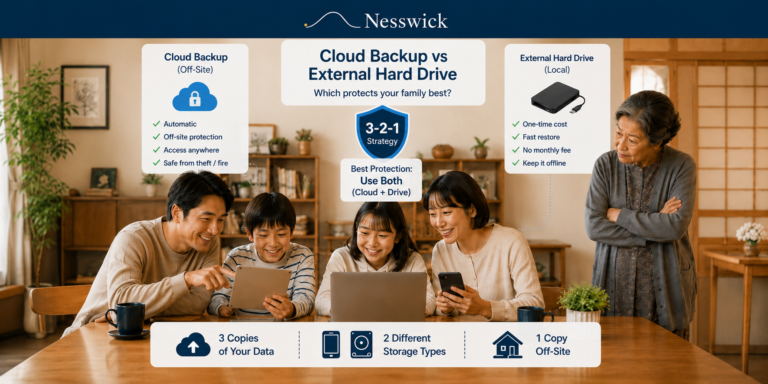
Cloud backup and a local drive solve different parts of the same problem. A local drive can restore large amounts of data without depending on broadband and remains available when the internet is down.
Our guide to cloud backup versus an external hard drive explains why many households use both.
Backblaze Computer Backup is a backup service, not a general-purpose sync folder that keeps the same working files synchronized across multiple computers. If cross-device file sync is the goal, cloud storage/sync is a different product category.
Who this suits
One computer holding most of the important data. A single laptop or desktop with a large photo, video or work archive fits the per-computer, unlimited-data model well.
People who want automatic continuous backup. Backblaze is designed to run in the background and back up user-created data without requiring a storage quota to be managed.
Households where one machine is the main archive. The economics are clearest when most irreplaceable files live on one licensed computer and its supported directly connected drives.
Who should skip it
Households with several computers that all matter. At the current annual rate, three licensed computers total $297 a year. A service with a multi-computer quota may be more economical depending on how much data those machines hold. We compare that trade directly in Backblaze vs IDrive.
Anyone whose data lives on a NAS. NAS devices are excluded from Backblaze Computer Backup; Backblaze directs NAS use cases to B2 Cloud Storage instead.
Anyone who needs more than one year of old-version retention without metered charges. Thirty days is the default, one year can be enabled free, and Forever retention charges for versions older than one year.
Anyone who wants cross-device sync. Computer Backup is the wrong product category for that job.
What a review like this cannot establish
We have not run Backblaze, so we make no claim about upload speed, how long an initial backup takes, application usability, behavior on a slow connection, restore speed in a particular household, or support responsiveness. Those are experiential questions that documentation cannot establish.
We also make no claim that any backup service guarantees a successful restore. A completed backup is not the same thing as a tested restore. Nothing here should be read as a guarantee against ransomware or any other form of data loss.


Related Resources
Affiliate Disclosure
Current relationship: Nesswick does not currently use affiliate links in this article. Product and service references are included for editorial purposes.
Sources and Methodology
This review was prepared without purchasing, installing or running Backblaze. Pricing, licensing, exclusions, version-history terms, external-drive retention, restore-by-mail pricing and security descriptions were re-verified against Backblaze’s current official pages on October 3, 2026. Derived figures are simple arithmetic from the current public prices. Where Backblaze describes mailed restore drives as free, this article states the return condition: the current restore page lists a $279 USB hard drive up to 8TB and says the purchase is refunded when the drive is returned within 30 days. File-type exclusions are described as defaults where Backblaze says they can be changed. External-drive reconnection is described according to the selected Version History rather than as a universal 30-day rule. Nesswick has not audited Backblaze’s encryption implementation and makes no experiential claims about speed, reliability, app quality, support or restore outcomes.
Last reviewed and verified: October 3, 2026.